

Manuals
Manuals
- Overview
- Scene Editing
- Code editor
- Custom project templates
- Editor scripts
- Editor scripts: UI
- Debugger
- Preferences
- Refactoring
- Styling
- Importing assets
- Caching assets
- Importing 2D graphics
- Importing 3D models
- Adapting to different screen sizes
- Live update
- Atlas
- Buffer
- Font
- Resource management
- Tile source
- Texture filtering
- Texture compression
- Overview
- Flipbook Animation
- Model animation
- Property animation (tweens)
- Rive animation (English)
- Spine animation (English)
- Overview
- Collection factory
- Collection proxy
- Collision object
- Camera
- Factory
- Label
- Light
- Mesh
- Model
- Particle FX
- Rive (English)
- Sound
- Spine (English)
- Sprite
- Tilemap
- GUI overview
- Box nodes
- Text nodes
- Pie nodes
- Spine nodes (English)
- ParticleFX nodes
- Template nodes
- Scripts
- Clipping
- Layouts
- Physics overview
- Collision objects
- Collision shapes
- Collision groups
- Collision messages
- Collision events listener
- Resolving collisions
- Ray casts
- Joints and constraints
- Scripts
- Properties
- Script properties
- Lua in Defold
- Source code obfuscation
- Modules
- Debugging
- Writing code
- Application security
- Bundling an application
- Caching assets
- Command line tools
- Hot reloading
- Porting guidelines
- Refactoring
- The mobile dev app
- Version control
- Writing code
- Working offline
- Debugging game logic
- Debugging native code
- Debugging native code on Android
- Debugging native code on iOS
- Reading game and system logs
- Optimizing an application
- Optimize game size
- Optimize runtime performance
- Optimize battery usage
- Optimize memory usage
- Profiling
- Introduction
- Advertising Info (English)
- AdMob ads (English)
- Android Device Performance Framework (English)
- App review and ratings (English)
- AppLovin MAX ad mediation (English)
- Camera (English)
- Facebook (English)
- Firebase Analytics (English)
- Firebase Remote Config (English)
- Google Play Game Services (English)
- Google Play Instant (English)
- Inter-app communication
- LevelPlay ad mediation (English)
- Push notifications (English)
- Play Asset Delivery (English)
- Safe Area (English)
- Webview (English)
- The mobile dev app
- Introduction
- Advertising Info (English)
- AdMob ads (English)
- App review and ratings (English)
- AppLovin MAX ad mediation (English)
- Camera (English)
- Facebook (English)
- Firebase Analytics (English)
- Firebase Remote Config (English)
- Inter-app communication
- LevelPlay ad mediation (English)
- Push notifications (English)
- Safe Area (English)
- Webview (English)
- The mobile dev app
- Introduction
- CrazyGames (English)
- Facebook (English)
- Facebook Instant Games (English)
- Poki (English)
- Wavedash (English)
Browse manuals Modelli dell'editor
Getting Started
Project Setup
Editor
Core Concepts
Assets and Resources
Animations
Components
GUI
Fonts and text
Physics
Game logic
Files
Network Connections
Workflow
Debugging
Optimization
Monetization
Android
- Introduction
- Advertising Info (English)
- AdMob ads (English)
- Android Device Performance Framework (English)
- App review and ratings (English)
- AppLovin MAX ad mediation (English)
- Camera (English)
- Facebook (English)
- Firebase Analytics (English)
- Firebase Remote Config (English)
- Google Play Game Services (English)
- Google Play Instant (English)
- Inter-app communication
- LevelPlay ad mediation (English)
- Push notifications (English)
- Play Asset Delivery (English)
- Safe Area (English)
- Webview (English)
- The mobile dev app
iOS
- Introduction
- Advertising Info (English)
- AdMob ads (English)
- App review and ratings (English)
- AppLovin MAX ad mediation (English)
- Camera (English)
- Facebook (English)
- Firebase Analytics (English)
- Firebase Remote Config (English)
- Inter-app communication
- LevelPlay ad mediation (English)
- Push notifications (English)
- Safe Area (English)
- Webview (English)
- The mobile dev app
HTML5
This translation is community contributed and may not be up to date. We only maintain the English version of the documentation. Read this manual in English
Modelli dell’editor
Puoi aggiungere i tuoi modelli di progetto personalizzati alla finestra New Project:
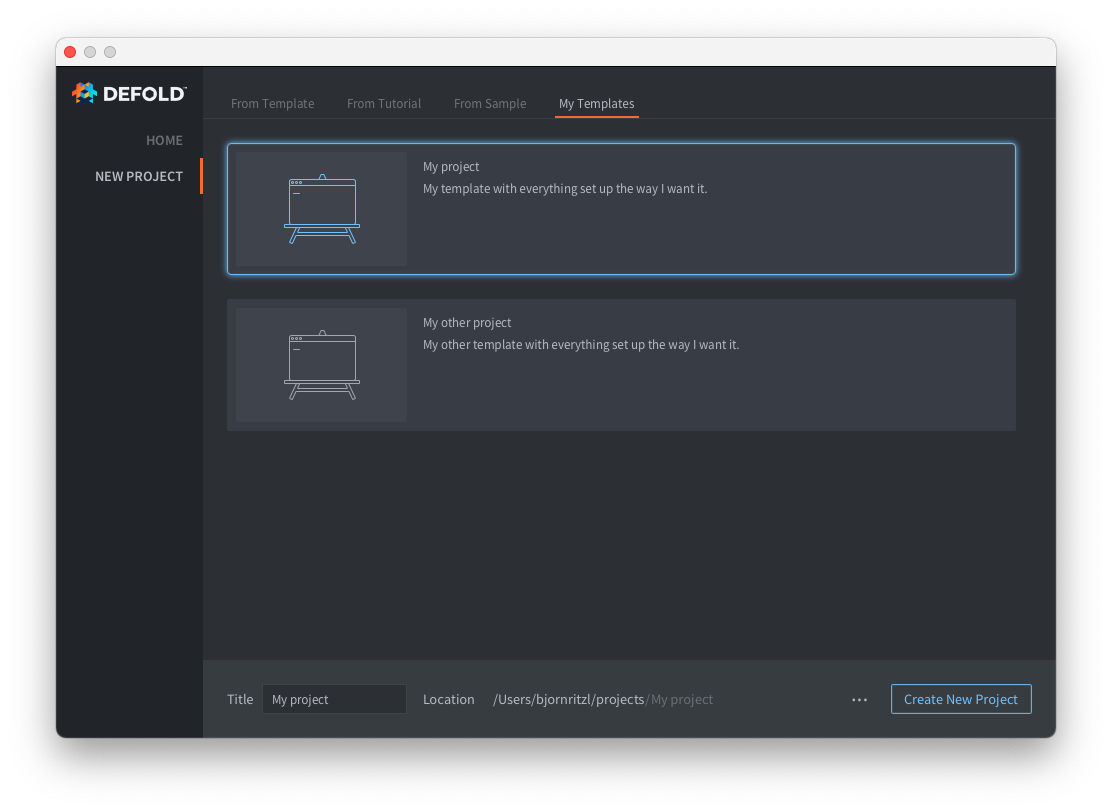
Per aggiungere una o più nuove schede con modelli di progetto personalizzati, devi aggiungere un file welcome.edn nella cartella .defold all’interno della tua cartella personale:
- Crea una cartella chiamata
.defoldnella tua cartella personale.- Su Windows
C:\Users\**Your Username**\.defold - Su macOS
/Users/**Your Username**/.defold - Su Linux
~/.defold
- Su Windows
- Crea un file
welcome.ednnella cartella.defold
Il file welcome.edn usa il formato Extensible Data Notation. Esempio:
{:new-project
  {:categories [
    {:label "My Templates"
     :templates [
          {:name "My project"
           :description "My template with everything set up the way I want it."
           :image "empty.svg"
           :zip-url "https://github.com/britzl/template-project/archive/master.zip"
           :skip-root? true},
          {:name "My other project"
           :description "My other template with everything set up the way I want it."
           :image "empty.svg"
           :zip-url "https://github.com/britzl/template-other-project/archive/master.zip"
           :skip-root? true}]
    }]
  }
}
Questo crea l’elenco di modelli visibile nella schermata qui sopra.
Puoi usare soltanto le immagini dei modelli incluse nell’editor.
Did you spot an error or do you have a suggestion? Please let us know on GitHub!
GITHUB