

This translation is community contributed and may not be up to date. We only maintain the English version of the documentation. Read this manual in English
Defold における入力の基本的な仕組み、入力の受信方法、スクリプトファイルで入力を受信する順序について、あらかじめ理解しておくことをお勧めします。入力システムの詳細は、入力の概要マニュアルを参照してください。
キートリガー
キートリガー(key trigger)を使うと、キーボードの単一キーによる入力をゲーム内のアクション(action)にバインドできます。各キーは、対応するアクションに個別に割り当てられます。キートリガーは、矢印キーや WASD キーによるキャラクターの移動など、特定のボタンを特定の機能に結び付けるために使います。任意のキーボード入力を読み取る必要がある場合は、テキストトリガー(text trigger)を使ってください(下記参照)。
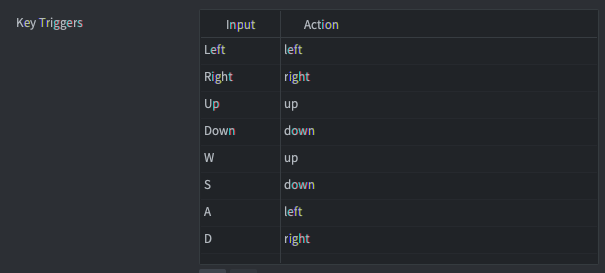
function on_input(self, action_id, action)
    if action_id == hash("left") then
        if action.pressed then
            -- start moving left
        elseif action.released then
            -- stop moving left
        end
    end
end
テキストトリガー
テキストトリガーは、任意のテキスト入力を読み取るために使います。テキストトリガーには、text と marked-text の2種類があります。

テキスト
text は通常のテキスト入力を取得します。アクションテーブルの text フィールドに、入力された文字を含む文字列を設定します。アクションはボタンが押されたときにのみ発生し、release や repeated のアクションは送信されません。
function on_input(self, action_id, action)
    if action_id == hash("text") then
        -- Concatenate the typed character to the "user" node...
        local node = gui.get_node("user")
        local name = gui.get_text(node)
        name = name .. action.text
        gui.set_text(node, name)
    end
end
変換中のテキスト
marked-text は、複数回のキー操作が1つの入力に対応するアジア言語のキーボードで主に使います。たとえば、iOS の「Japanese-Kana」キーボードでは、ユーザーが組み合わせを入力すると、キーボードの上部に入力できる文字や文字列が表示されます。
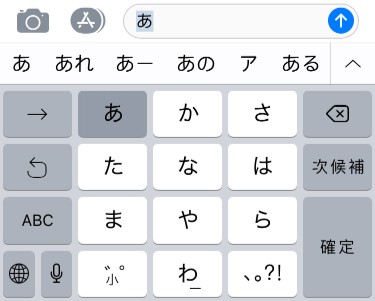
- キーを押すたびに個別のアクションが生成され、アクションの
textフィールドに現在入力されている文字列(「変換中のテキスト(marked text)」)が設定されます。 - ユーザーが文字または文字の組み合わせを選択すると、
text型のトリガーによるアクションが別途送信されます(入力バインディング(input binding)のリストに設定されている場合)。この別のアクションは、アクションのtextフィールドに確定した文字列を設定します。