

This translation is community contributed and may not be up to date. We only maintain the English version of the documentation. Read this manual in English
スクリプトプロパティ
スクリプトプロパティ(script property)は、特定のゲームオブジェクト(game object)のインスタンスに対してカスタムプロパティを定義し、公開するための、シンプルで強力な方法です。スクリプトプロパティは、エディターで特定のインスタンスに対して直接編集できます。また、その設定値をコードで使用してゲームオブジェクトの動作を変更できます。スクリプトプロパティは、次のような多くの場合に非常に役立ちます。
- エディターで特定のインスタンスの値を上書きして、スクリプトの再利用性を高めたい場合。
- 初期値を指定してゲームオブジェクトを生成したい場合。
- プロパティの値をアニメーションさせたい場合。
- あるスクリプトの状態データに別のスクリプトからアクセスしたい場合。(オブジェクト間で頻繁にプロパティにアクセスする場合は、データを共有ストレージに移したほうがよいことがあります。)
一般的な使用例として、特定の敵 AI の体力や速度、取得できるアイテムのオブジェクトの色調、スプライト(sprite)のアトラス(atlas)、またはボタンのオブジェクトが押されたときに送信するメッセージ、その送信先、あるいはその両方を設定する場合があります。
スクリプトプロパティの定義
スクリプトプロパティは、特殊な関数 go.property() で定義することでスクリプトコンポーネント(script component)に追加します。この関数はトップレベル、つまり init() や update() などのライフサイクル関数の外側で使用する必要があります。プロパティに指定するデフォルト値によって、そのプロパティの型が決まります。型には number、boolean、string、hash、msg.url、vmath.vector3、vmath.vector4、vmath.quaternion、resource があります(下記を参照)。
ハッシュ値から元の文字列を逆引きできるのは、デバッグを容易にするための Debug ビルドだけです。Release ビルドには逆引き用の文字列の値が存在しないため、tostring() を hash 値に使用して文字列を取り出そうとしても意味がありません。
-- can.script
-- Define script properties for health and an attack target
go.property("health", 100)
go.property("target", msg.url())

function init(self)
  -- store initial position of target.
  -- self.target is a url referencing another object.
  self.target_pos = go.get_position(self.target)
  ...
end

function on_message(self, message_id, message, sender)
  if message_id == hash("take_damage") then
    -- decrease the health property
    self.health = self.health - message.damage
    if self.health <= 0 then
      go.delete()
    end
  end
end
これにより、このスクリプトから作成したすべてのスクリプトコンポーネントのインスタンスで、プロパティの値を設定できます。
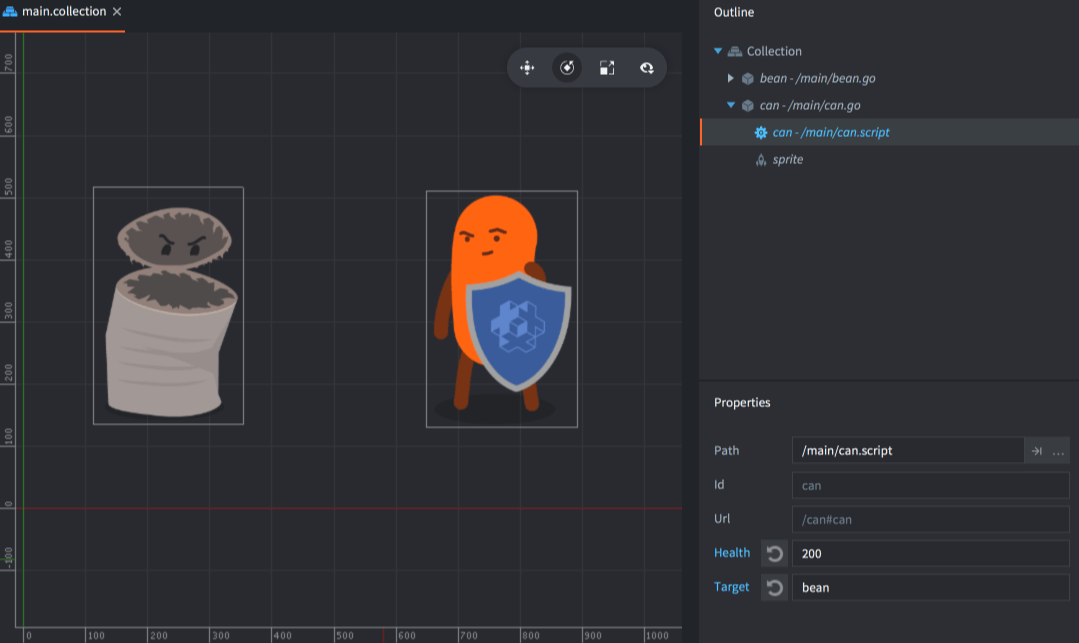
エディターの Outline ビューでスクリプトコンポーネントを選択すると、Properties ビューにプロパティが表示され、編集できるようになります。
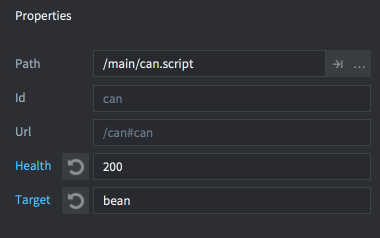
インスタンス固有の新しい値で上書きされたプロパティは、青色で表示されます。プロパティ名の横にあるリセットボタンをクリックすると、値がデフォルト(スクリプトで設定した値)に戻ります。
スクリプトプロパティは、プロジェクトのビルド時に解析されます。値を表す式は評価されません。つまり、go.property("hp", 3+6) のような指定は動作しませんが、go.property("hp", 9) は動作します。
テキストプロパティ
Defold 1.13.2 以降では、文字列の既定値でテキストプロパティを定義できます。テキストプロパティは UTF-8 と改行文字をサポートし、エディターの複数行フィールドで編集できます。
go.property("greeting", "Hello!\nWelcome, José!")

function init(self)
    go.set("#label", "text", self.greeting)
end
他のスクリプトプロパティと同じように、ゲームオブジェクトまたはコレクションでスクリプトコンポーネントを選択して、テキストプロパティを上書きできます。既定値や上書きする値には NUL 文字を含められません。
他のスクリプトは、スクリプトコンポーネントの URL を通じてテキストプロパティを読み書きできます。たとえば、コレクション内の speaker という名前のゲームオブジェクトに上記のスクリプトとラベルを配置し、コンポーネント ID を script と label にします。別のスクリプトの init() から、次のように更新します。
function init(self)
    local greeting = go.get("/speaker#script", "greeting")
    go.set("/speaker#script", "greeting", greeting .. "\nEnjoy the game!")
    go.set("/speaker#label", "text", go.get("/speaker#script", "greeting"))
end
スクリプトプロパティを変更しても、ラベルは自動的に更新されません。最後の行で、新しい値をラベルの text プロパティに明示的にコピーしています。
スクリプトプロパティへのアクセス
定義したすべてのスクリプトプロパティは、スクリプトインスタンスへの参照である self に格納されたメンバーとして利用できます。
-- my_script.script
go.property("my_property", 1)

function update(self, dt)
  -- Read and write the property
  if self.my_property == 1 then
      self.my_property = 3
  end
end
ユーザー定義のスクリプトプロパティは、go.get() で読み取り、go.set() で書き込むこともできます。ベクトルやクォータニオンを含む数値プロパティは、go.animate() でアニメーションできます。テキストプロパティは読み書きできますが、アニメーションはできません。
-- another.script

-- increase "my_property" in "myobject#script" by 1
local val = go.get("myobject#my_script", "my_property")
go.set("myobject#my_script", "my_property", val + 1)

-- animate "my_property" in "myobject#my_script"
go.animate("myobject#my_script", "my_property", go.PLAYBACK_LOOP_PINGPONG, 100, go.EASING_LINEAR, 2.0)
ファクトリーで作成したオブジェクト
ファクトリー(factory)を使ってゲームオブジェクトを作成する場合、作成時にスクリプトプロパティを設定できます。
local props = { health = 50, target = msg.url("player") }
local id = factory.create("#can_factory", nil, nil, props)

-- Accessing factory-created script properties
local url = msg.url(nil, id, "can")
local can_health = go.get(url, "health")
collectionfactory.create() でゲームオブジェクトの階層を生成する場合は、オブジェクトの ID とプロパティのテーブルを対応付ける必要があります。これらを1つのテーブルにまとめ、create() 関数に渡します。
local props = {}
props[hash("/can1")] = { health = 150 }
props[hash("/can2")] = { health = 250, target = msg.url("player") }
props[hash("/can3")] = { health = 200 }

local ids = collectionfactory.create("#cangang_factory", nil, nil, props)
factory.create() と collectionfactory.create() で指定したプロパティの値は、プロトタイプ(prototype)ファイルに設定された値と、スクリプト内のデフォルト値の両方を上書きします。
ゲームオブジェクトに取り付けた複数のスクリプトコンポーネントが同じプロパティを定義している場合、各コンポーネントは factory.create() または collectionfactory.create() に渡した値で初期化されます。
リソースプロパティ
リソースプロパティ(resource property)は、基本データ型のスクリプトプロパティと同じように定義します。
go.property("my_atlas", resource.atlas("/atlas.atlas"))
go.property("my_font", resource.font("/font.font"))
go.property("my_material", resource.material("/material.material"))
go.property("my_texture", resource.texture("/texture.png"))
go.property("my_tile_source", resource.tile_source("/tilesource.tilesource"))
リソースプロパティを定義すると、ほかのスクリプトプロパティと同様に Properties ビューに表示されますが、ファイルやリソースを参照して選択するフィールドとして表示されます。
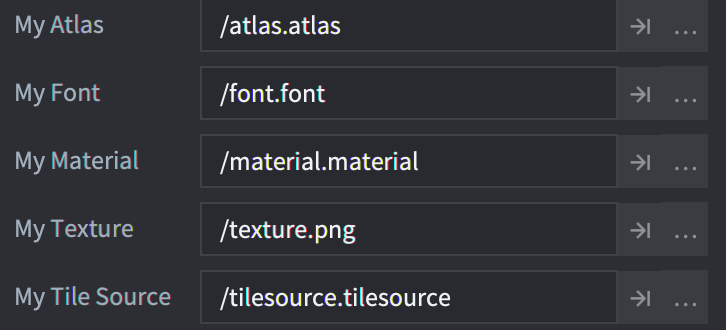
リソースプロパティには go.get() またはスクリプトインスタンスへの参照 self を介してアクセスし、go.set() を使って利用します。
function init(self)
  go.set("#sprite", "image", self.my_atlas)
  go.set("#label", "font", self.my_font)
  go.set("#sprite", "material", self.my_material)
  go.set("#model", "texture0", self.my_texture)
  go.set("#tilemap", "tile_source", self.my_tile_source)
end