

Manuals
Manuals
- Overview
- Scene Editing
- Code editor
- Custom project templates
- Editor scripts
- Editor scripts: UI
- Debugger
- Preferences
- Refactoring
- Styling
- Importing assets
- Caching assets
- Importing 2D graphics
- Importing 3D models
- Adapting to different screen sizes
- Live update
- Atlas
- Buffer
- Font
- Resource management
- Tile source
- Texture filtering
- Texture compression
- Overview
- Flipbook Animation
- Model animation
- Property animation (tweens)
- Rive animation (English)
- Spine animation (English)
- Overview
- Collection factory
- Collection proxy
- Collision object
- Camera
- Factory
- Label
- Light
- Mesh
- Model
- Particle FX
- Rive (English)
- Sound
- Spine (English)
- Sprite
- Tilemap
- GUI overview
- Box nodes
- Text nodes
- Pie nodes
- Spine nodes (English)
- ParticleFX nodes
- Template nodes
- Scripts
- Clipping
- Layouts
- Physics overview
- Collision objects
- Collision shapes
- Collision groups
- Collision messages
- Collision events listener
- Resolving collisions
- Ray casts
- Joints and constraints
- Scripts
- Properties
- Script properties
- Lua in Defold
- Source code obfuscation
- Modules
- Debugging
- Writing code
- Application security
- Bundling an application
- Caching assets
- Command line tools
- Hot reloading
- Porting guidelines
- Refactoring
- The mobile dev app
- Version control
- Writing code
- Working offline
- Debugging game logic
- Debugging native code
- Debugging native code on Android
- Debugging native code on iOS
- Reading game and system logs
- Optimizing an application
- Optimize game size
- Optimize runtime performance
- Optimize battery usage
- Optimize memory usage
- Profiling
- Introduction
- Advertising Info (English)
- AdMob ads (English)
- Android Device Performance Framework (English)
- App review and ratings (English)
- AppLovin MAX ad mediation (English)
- Camera (English)
- Facebook (English)
- Firebase Analytics (English)
- Firebase Remote Config (English)
- Google Play Game Services (English)
- Google Play Instant (English)
- Inter-app communication
- LevelPlay ad mediation (English)
- Push notifications (English)
- Play Asset Delivery (English)
- Safe Area (English)
- Webview (English)
- The mobile dev app
- Introduction
- Advertising Info (English)
- AdMob ads (English)
- App review and ratings (English)
- AppLovin MAX ad mediation (English)
- Camera (English)
- Facebook (English)
- Firebase Analytics (English)
- Firebase Remote Config (English)
- Inter-app communication
- LevelPlay ad mediation (English)
- Push notifications (English)
- Safe Area (English)
- Webview (English)
- The mobile dev app
- Introduction
- CrazyGames (English)
- Facebook (English)
- Facebook Instant Games (English)
- Poki (English)
- Wavedash (English)
Browse manuals 에디터 템플릿
Getting Started
Project Setup
Editor
Core Concepts
Assets and Resources
Animations
Components
GUI
Fonts and text
Physics
Game logic
Files
Network Connections
Workflow
Debugging
Optimization
Monetization
Android
- Introduction
- Advertising Info (English)
- AdMob ads (English)
- Android Device Performance Framework (English)
- App review and ratings (English)
- AppLovin MAX ad mediation (English)
- Camera (English)
- Facebook (English)
- Firebase Analytics (English)
- Firebase Remote Config (English)
- Google Play Game Services (English)
- Google Play Instant (English)
- Inter-app communication
- LevelPlay ad mediation (English)
- Push notifications (English)
- Play Asset Delivery (English)
- Safe Area (English)
- Webview (English)
- The mobile dev app
iOS
- Introduction
- Advertising Info (English)
- AdMob ads (English)
- App review and ratings (English)
- AppLovin MAX ad mediation (English)
- Camera (English)
- Facebook (English)
- Firebase Analytics (English)
- Firebase Remote Config (English)
- Inter-app communication
- LevelPlay ad mediation (English)
- Push notifications (English)
- Safe Area (English)
- Webview (English)
- The mobile dev app
HTML5
This translation is community contributed and may not be up to date. We only maintain the English version of the documentation. Read this manual in English
에디터 템플릿
New Project 창에 직접 만든 커스텀 프로젝트 템플릿을 추가할 수 있습니다:
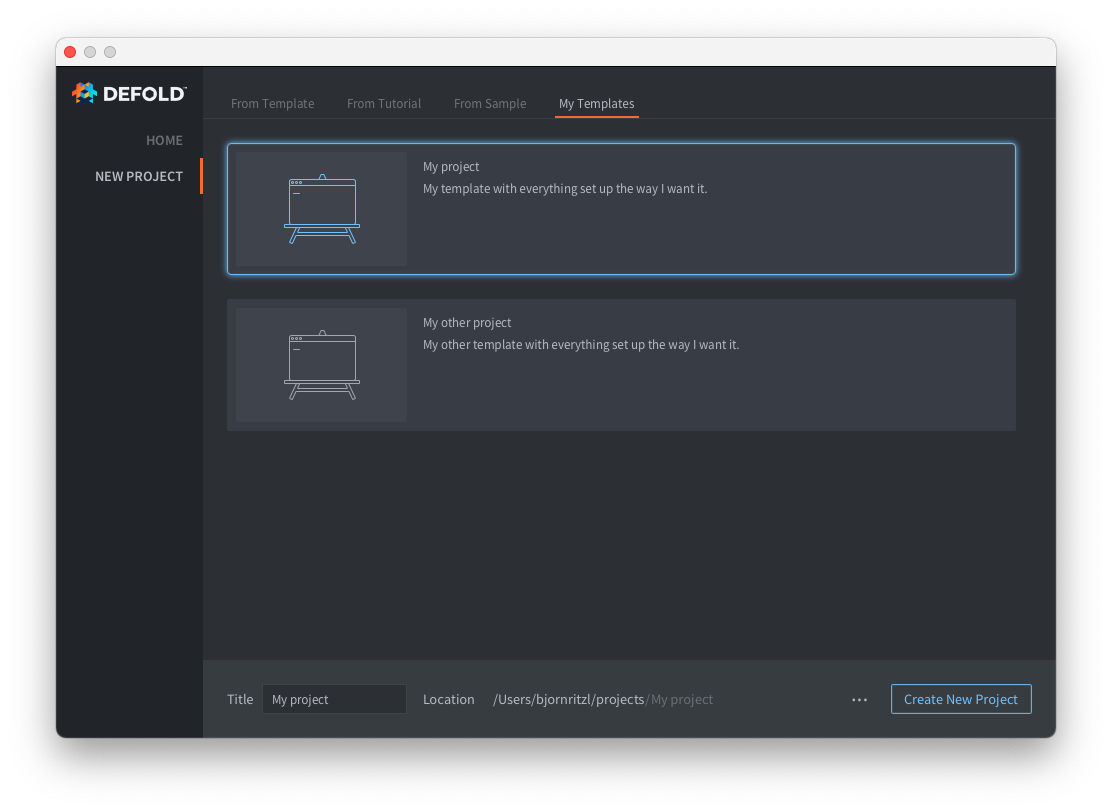
커스텀 프로젝트 템플릿이 있는 새 탭을 하나 이상 추가하려면 사용자 홈 디렉토리의 .defold 폴더에 welcome.edn 파일을 추가해야 합니다:
- 사용자 홈 디렉토리에
.defold라는 이름의 폴더를 만듭니다.- Windows의 경우
C:\Users\**Your Username**\.defold - macOS의 경우
/Users/**Your Username**/.defold - Linux의 경우
~/.defold
- Windows의 경우
.defold폴더에welcome.edn파일을 만듭니다.
welcome.edn 파일은 Extensible Data Notation 포멧을 사용합니다. 예:
{:new-project
  {:categories [
    {:label "My Templates"
     :templates [
          {:name "My project"
           :description "My template with everything set up the way I want it."
           :image "empty.svg"
           :zip-url "https://github.com/britzl/template-project/archive/master.zip"
           :skip-root? true},
          {:name "My other project"
           :description "My other template with everything set up the way I want it."
           :image "empty.svg"
           :zip-url "https://github.com/britzl/template-other-project/archive/master.zip"
           :skip-root? true}]
    }]
  }
}
그러면 위 스크린샷에 보이는 템플릿 목록이 생성됩니다.
에디터에 번들된 템플릿 이미지만 사용할 수 있습니다.
Did you spot an error or do you have a suggestion? Please let us know on GitHub!
GITHUB