

Directional Light Shadows with PCF Filtering
Description
This example adds real-time shadows to a directional light and provides a custom render script for drawing shadows in a small 3D scene.
Drag with the mouse or touch to orbit the display camera, and scroll or pinch to zoom.
What You’ll Learn
- What shadow mapping is and how to add a shadow depth pass to a custom Defold render pipeline.
- How an orthographic Camera component defines the finite volume covered by a directional shadow map.
- How to render model depth from the light’s point of view and compare it with visible fragments.
- How caster-side polygon offset and receiver-side depth bias reduce self-shadowing artifacts.
- How Percentage-Closer Filtering (PCF) softens pixelated shadow edges.
- How PCF kernel size and sample spacing affect quality and performance of shadows.
- How to use a separate
shadows.glslinclude in shaders for shadow related functions.
Setup
The collection contains:
scenegame object with 3D models forming a small citycameragame object with main camera to show the scene and a script to orbit and zoom the view-
lightsgame object with:- 2 game objects with 3D go-karts models with script that animate their position back and forth
-
sungame object with:- an ambient light component
- a directional light component,
- an orthographic
shadow_cameracomponent, - and
directional_shadow.script.
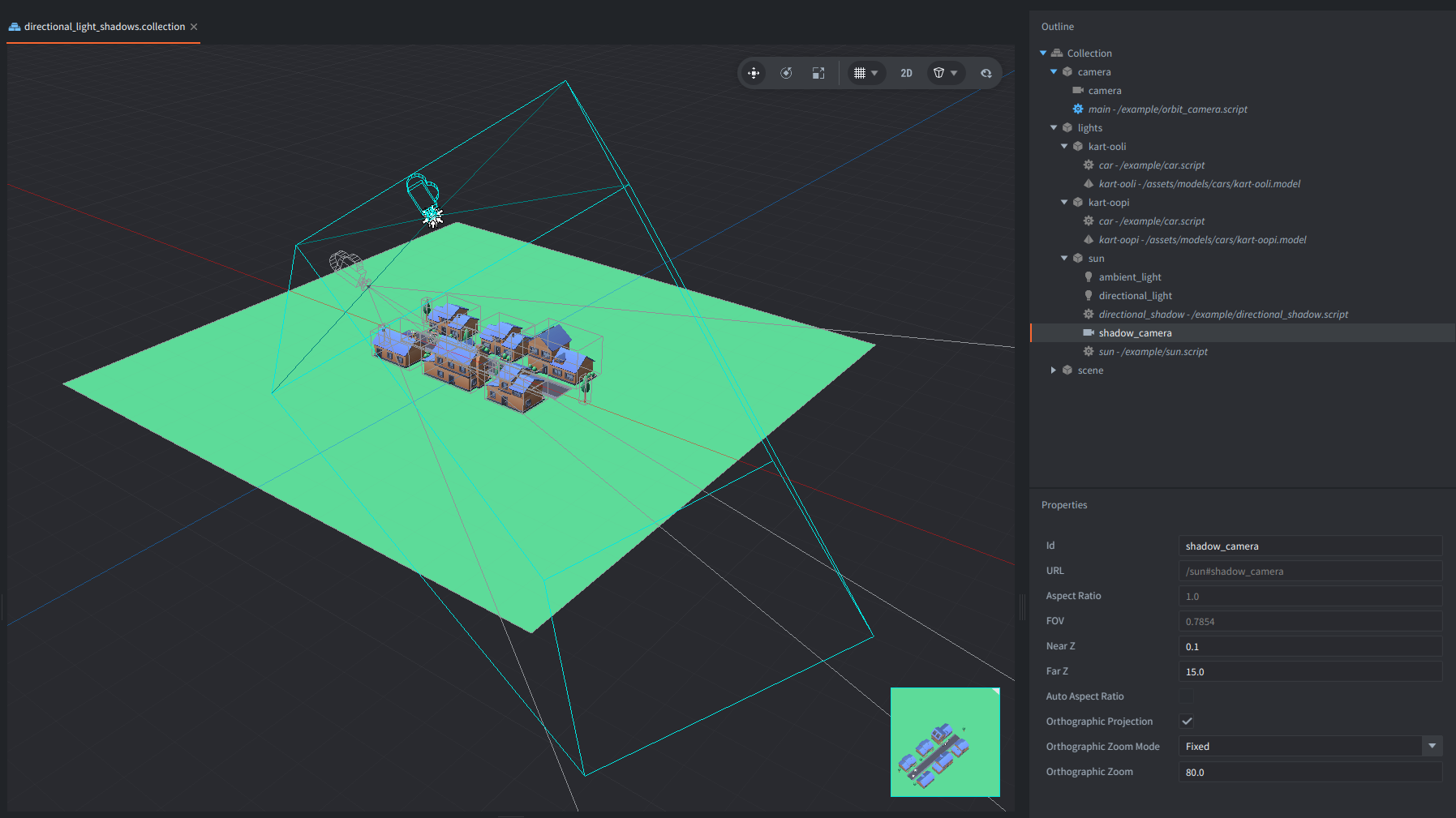
Because the directional light and camera share a transform, they “look” in the same direction. The Camera component for the “sun” makes the shadow volume visible and editable in the editor.
The shadow camera has a near plane of 0.1, a far plane of 15.0, and an Orthographic Zoom of 80.0. These values define the depth and area covered by the shadow map. Geometry outside this volume does not cast a shadow into the map, and visible fragments outside it are treated as lit.
The custom render resource registers two materials:
- a depth-only material for creating the shadow map;
- a lit receiver material for sampling it.
The materials are enabled only for their respective render passes. The receiver pass temporarily overrides the model material while keeping the model texture available through tex0.

The presentation models are from Kenney asset packs, licensed under CC0.
How It Works
The sun.script slowly rotates the game object containing the directional light and shadow camera.
This demonstrates that the depth map is updated as the light direction changes.
What is Shadow Mapping
Shadow mapping is a rendering technique used to determine which parts of a 3D scene are hidden from a light source.
It answers one question for each visible fragment: Can the directional light see this point?
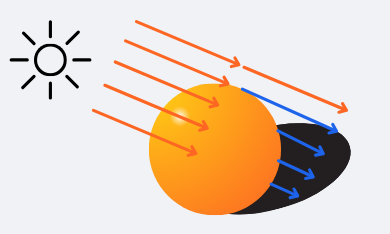
In other words, it is about “looking” at the world precisely like the “shadow camera”, so from a perspective of a light that casts these shadows. If something is not visible in this camera (occluded by other models), it means it is in shadow of this light.
The scene is first rendered from the light’s perspective into a depth texture called a shadow map. Each texel stores the depth of the closest surface seen by the shadow camera.
During the main render pass, each visible world position is projected into the shadow map. The fragment’s depth from the light is compared with the depth stored in the texture. If the fragment is farther away, another surface is between it and the light, so the fragment is in shadow.
An orthographic projection is acceptable for a directional light.
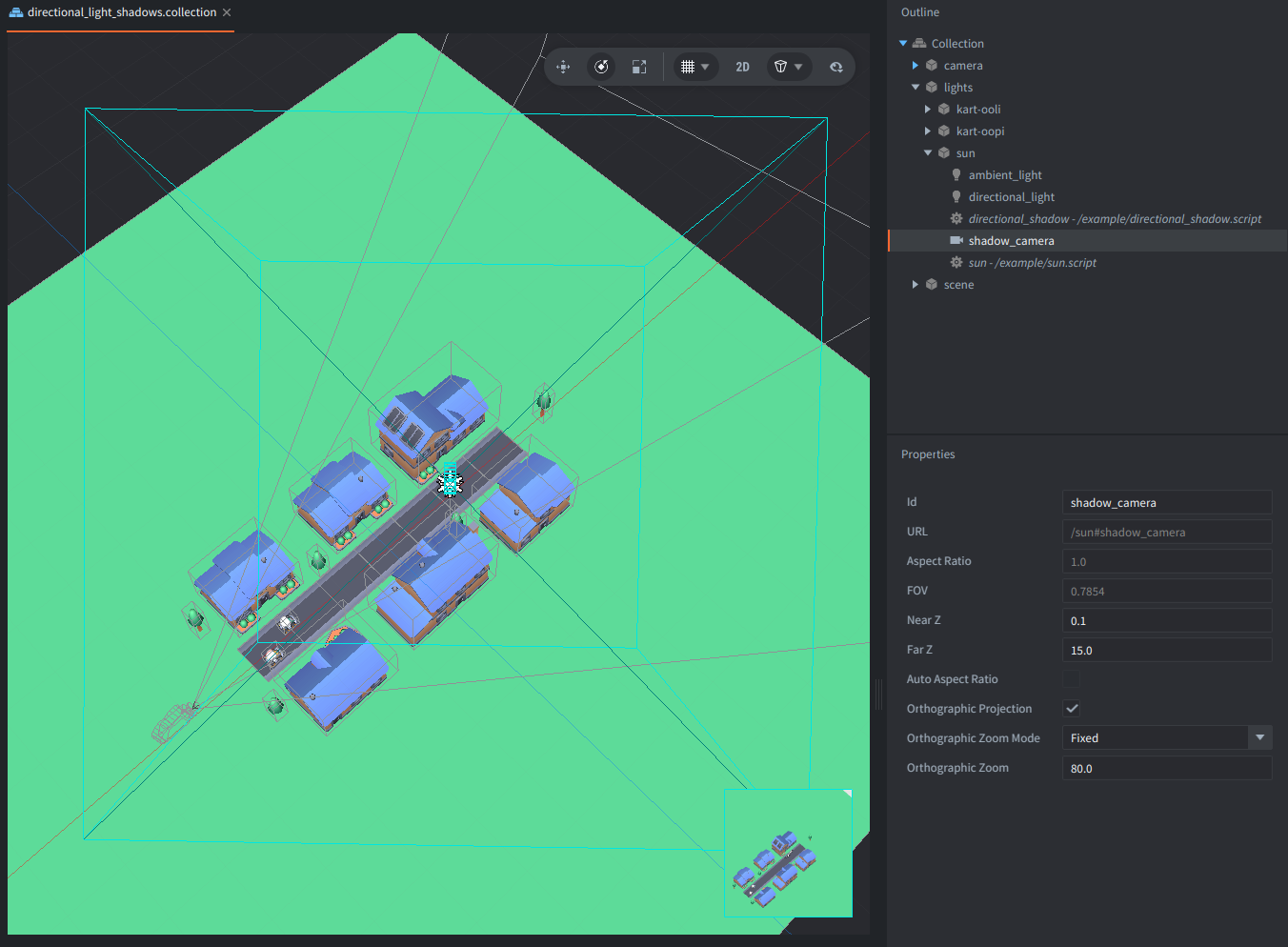
Note that the required matrices could be calculated manually from the light transform. But this example uses a Defold Camera component instead because it makes the shadow volume easy to configure, understand and inspect directly in the editor:
Shadow Properties
The script directional_shadow.script exposes the following game object properties:
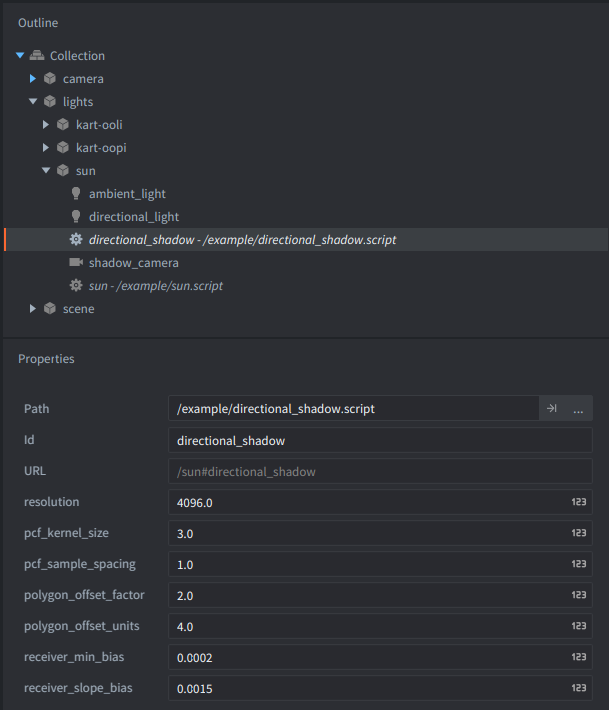
resolution
Default: 4096
Creates a square depth texture with the given width and height. For example, 4096 creates a 4096 x 4096 shadow map.
The value must be greater than 0.
Common values are 1024, 2048, 4096, and 8192, but the best value depends on the scene and target hardware. A higher resolution can produce sharper shadows because more texels cover the shadow volume. It also uses more GPU memory, increases the work required to clear and render the depth map, and may exceed the maximum supported texture size on some devices.
pcf_kernel_size
Default: 3
Selects one of three supported Percentage-Closer Filtering (PCF) kernel sizes:
1— one depth comparison and a hard shadow edge; PCF filtering is effectively disabled;3— a 3 x 3 kernel with9depth comparisons per shadowed fragment;5— a 5 x 5 kernel with25depth comparisons per shadowed fragment.
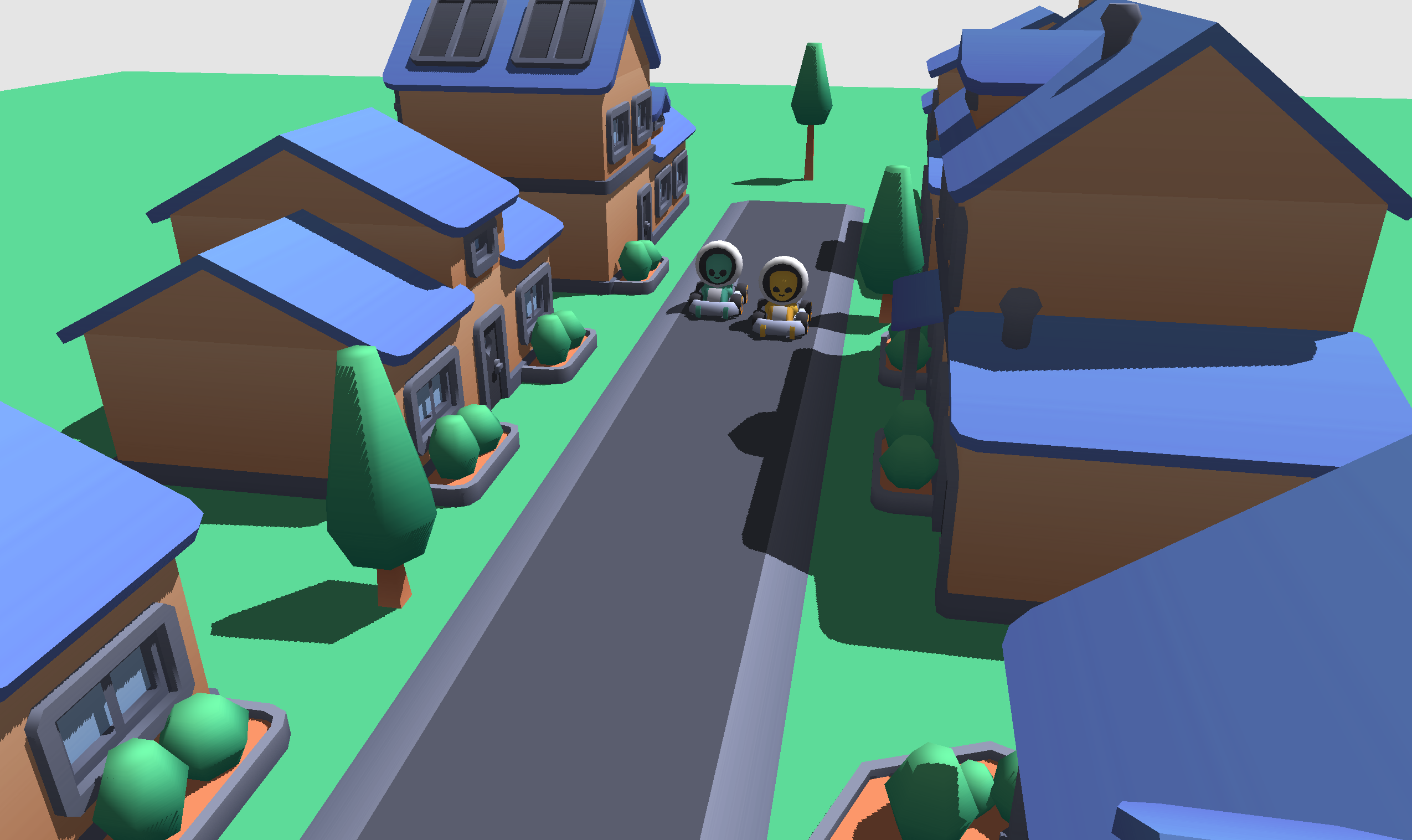
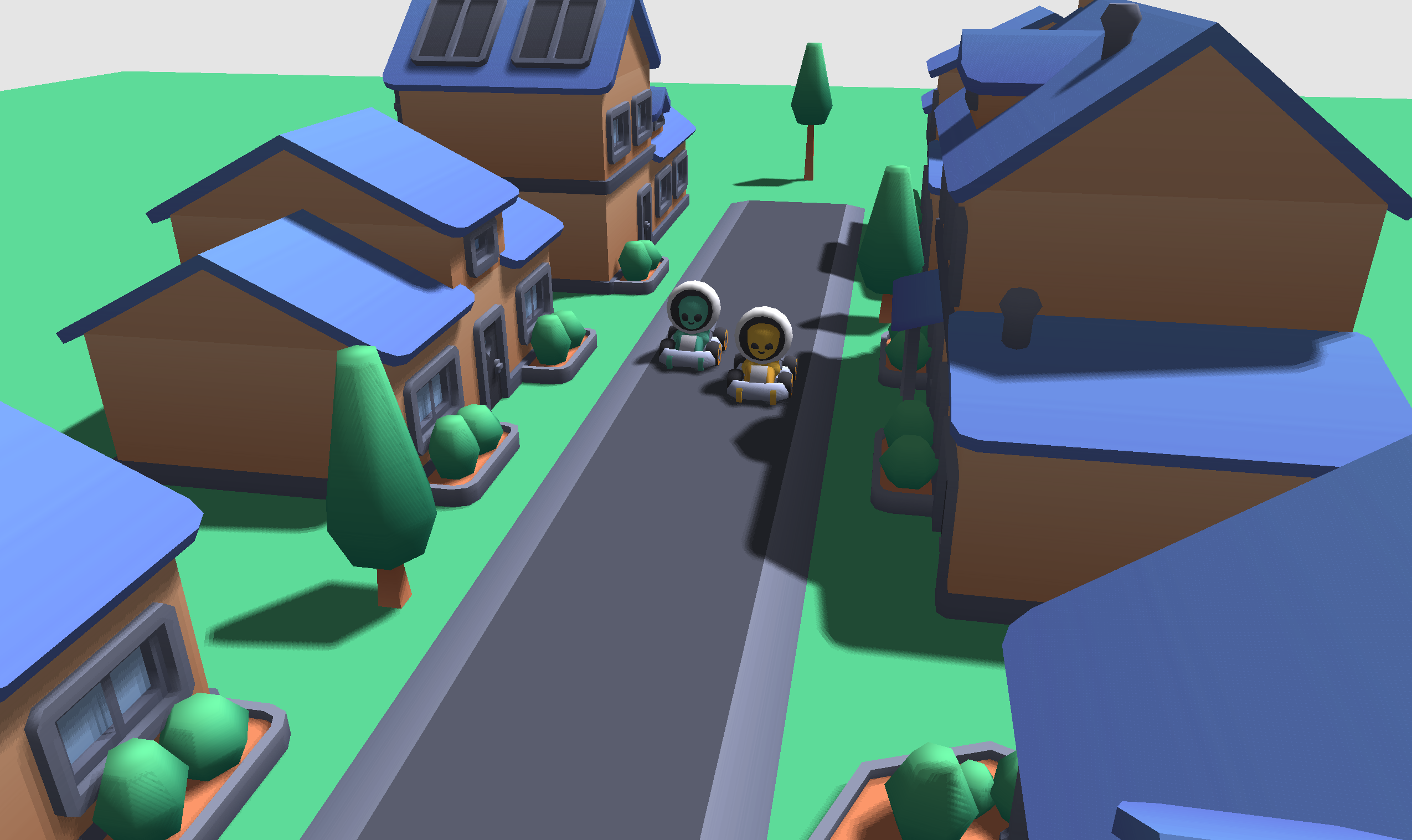
PCF softens jagged, blocky shadow edges by sampling several nearby points and averaging whether those samples are lit or shadowed. A larger kernel produces more visibility levels along the edge, but costs more because the receiver shader reads the shadow map more often.
With pcf_kernel_size = 1, shadow texels are easy to see:
With a larger PCF kernel, the edge is smoother:
This example uses square kernels. Other sample patterns, such as a Poisson disk, can produce a different appearance.
pcf_sample_spacing
Default: 1.0
Controls the distance between neighboring PCF samples, measured in shadow-map texels. It changes the area covered by the selected kernel, but it does not change the number of samples.
The value must be greater than or equal to 0.0.
Examples:
0.5places taps half a texel apart and produces a tighter filter footprint;1.0samples neighboring texels;2.0places taps two texels apart and produces a wider, more sparsely sampled transition.
Changing the spacing has little direct effect on performance because the selected kernel still performs the same number of samples. Very large values may have slightly worse texture-cache locality and can make the edge look banded or sparse.
A value of 0.0 makes every tap sample the same location. Use pcf_kernel_size = 1 instead when filtering is not needed.
polygon_offset_factor
Default: 2.0
Controls the slope-dependent part of the caster-side polygon offset used while writing the shadow map. It is especially useful on surfaces strongly angled relative to the light.
Increasing it can reduce shadow acne and visible triangle patterns, but excessive values can make shadows detach from their casters. This detached appearance of shadows is often called Peter Panning.
A value of 0.0 disables this part of the polygon offset. Non-negative values are normally the useful range for this setup.
polygon_offset_units
Default: 4.0
Controls the more constant, depth-buffer-dependent part of the caster-side polygon offset.
Increasing it can remove remaining self-shadowing artifacts. If it is too large, contact shadows may move away from the objects that cast them.
A value of 0.0 disables this part of the polygon offset. The exact effect depends on the graphics backend and depth-buffer precision.
receiver_min_bias
Default: 0.0002
Defines the minimum depth bias applied when the receiver shader compares a visible fragment with the stored shadow-map depth.
A value that is too small may leave shadow acne. A value that is too large can remove small contact shadows and separate the shadow from the caster. Non-negative values are normally used.
receiver_slope_bias
Default: 0.0015
Controls how much additional receiver bias is applied as a surface turns away from the light. Surfaces at a grazing light angle are more likely to suffer from depth precision artifacts, so they receive more bias.
Increasing this value can remove acne from angled surfaces. Excessive values can make shadows look detached or cause thin shadows to disappear. Non-negative values are normally used.
The caster-side polygon offset and receiver-side bias solve related problems at different stages of shadow mapping. Adjust them gradually rather than increasing several values by a large amount at once.
Sending the Properties to the Renderer
The script sends the camera URL and all shadow properties to the @render: socket from init() using a set_directional_shadow message. To change them at runtime, send the same message again with the new values. Changing resolution recreates the shadow render target.
shadow_mapping.on_message() stores the configuration and updates the material constants. Four scalar receiver settings are packed into one shadow_params vector:
shadow_params.x = PCF kernel size: 1, 3, or 5
shadow_params.y = PCF sample spacing in texels
shadow_params.z = minimum receiver bias
shadow_params.w = slope-dependent receiver bias
mtx_shadow and shadow_texel_size remain separate because they represent different types of data.
shadow_texel_size converts offsets expressed in shadow-map texels into normalized texture coordinates.
Render Script Integration
The implementation is split between the copied default built-in render script and shadow_mapping.lua.
The custom render script directional_light_shadows.render_script contains seven integration points:
- Require
shadow_mapping.lua. - Exclude the shadow camera when choosing the display camera.
- Create the shadow context during render-script initialization.
- Render the depth map before selecting the display camera.
- Replace the default model draw with
shadow_mapping.render_models(), which binds the depth texture and receiver material only for that draw. - Forward messages to the shadow module before handling the default renderer’s messages.
- Release the shadow render target from the render script’s
final()function.
The module exposes five integration functions: init(), final(), on_message(), render_depth(), and render_models().
As a result, models are drawn once from the shadow camera to create the depth map and once from the display camera to draw the visible scene. The remaining render predicates continue normally after the model pass.
The example does not use texel snapping. It mainly stabilizes an orthographic shadow camera that translates through the world. Here the shadow camera stays in place and rotates with the directional light. Snapping one anchor point would not stabilize the rotating texel grid and could introduce visible jumps.
Rendering the Depth Map
shadow_mapping.render_depth() reads the current view and projection matrices from the shadow Camera component, binds a depth-only render target, and draws all entries tagged model from the light’s point of view.
Color writes are disabled because the shadow map needs only the nearest depth value seen by the light. Back-face culling is enabled, and the configurable polygon offset reduces self-shadowing artifacts while depth is written.
The function clears the selected Camera component with render.set_camera() and sets the shadow view and projection matrices explicitly with render.set_view() and render.set_projection(). After the depth pass, the default render target is restored, and the main render script selects the display camera.
The depth texture uses nearest filtering because the shader performs explicit depth comparisons for PCF. Linear filtering of a regular depth texture would interpolate raw depth values before the comparison, which can produce incorrect intermediate depths. Hardware-filtered depth comparison would require a different comparison-sampler implementation.
Comparing Depth and Applying Shadows
The receiver vertex shader transforms each model vertex into world space and then into homogeneous shadow-texture space with:
mtx_shadow = clip_to_texture_matrix * shadow_projection * shadow_view
The clip-to-texture matrix converts clip coordinates from -1..1 to texture coordinates in 0..1. It is sometimes called a bias matrix, but it is unrelated to the depth bias used to prevent shadow acne.
The fragment shader divides the interpolated shadow coordinate by w. Fragments outside the shadow camera volume are treated as lit.
For fragments inside the volume, the receiver bias is calculated from the surface normal and directional light direction. Surfaces facing the light use at least receiver_min_bias, while surfaces at grazing angles receive additional bias controlled by receiver_slope_bias. The biased receiver depth is then compared with the depth stored in the shadow map.
The selected kernel and sample spacing determine how nearby comparison results are combined into the final visibility value. The reusable implementation is kept in shadows.glsl. Its functions receive the shadow texture, coordinates, texel size, parameters, normal, and light direction through explicit arguments, so the include does not depend on variable names from the receiver shader.
The receiver material is based on Defold’s built-in lit model shader and keeps the built-in lighting.glsl unchanged. Shadow visibility multiplies directional diffuse-light contributions only. Ambient, point, and spot light contributions continue to work normally.
When This Technique Is Useful
A single directional shadow map is a good fit for:
- outdoor or indoor scenes with one main directional light, such as sunlight or moonlight;
- examples and projects that need real-time dynamic shadows without a complex renderer;
- scenes where one orthographic shadow volume can cover the important casters and receivers;
- rigid, opaque models using a compatible receiver material.
Its main advantages are:
- the technique is widely used and relatively easy to understand;
- the shadow volume can be edited visually with a normal Camera component;
- the depth pass stores only depth and does not require a color texture;
- quality and cost can be adjusted with resolution, kernel size, sample spacing, and bias controls;
- moving models and a rotating light update automatically because the depth map is rendered every frame;
- the reusable
shadows.glslfunctions can be included by other receiver shaders.
Costs and Limitations
This example intentionally uses a simple and approachable implementation:
- Shadow-casting models must be rendered again for the depth pass, and larger PCF kernels increase the cost of the receiver fragment shader.
- One orthographic shadow map distributes its detail across the complete shadow volume. Very large outdoor view distances may need cascaded shadow maps, which use several maps for different distance ranges.
- Depth precision requires carefully tuned polygon offset and receiver bias values. PCF smooths sampled edges, but it does not create a physically correct soft-shadow penumbra.
- The example assumes one shadow map for the directional lighting setup. If several directional lights are active, the same shadow visibility is currently applied to every directional diffuse contribution. Separate shadow-casting directional lights need separate maps and light selection.
- All entries tagged
modelare rendered into the shadow map and drawn with the receiver material. A production project may use separate predicates for casters and receivers. - The depth material supports rigid, opaque geometry. Skinned models, morph targets, vertex-deformed models, and instanced models may need depth shader variants that reproduce the same vertex deformation.
- Alpha-cutout geometry such as leaves, grass cards, and fences needs a depth material that samples alpha and discards transparent fragments. Otherwise the complete triangle casts a solid shadow.
- The receiver material is a simple lit model material. Projects using normal maps, PBR data, multiple textures, custom vertex attributes, or other shading models should include
shadows.glslin their own compatible receiver materials. - The shadow map is regenerated every frame because the example rotates the light continuously. A project with static lights and static casters could cache and reuse it.
- The technique produces shadows from a directional light only. Point and spot light shadow maps require different camera projections and, in the case of point lights, usually several views.
Scripts
directional_shadow.script
-- Shadow-map dimensions. Choose a value appropriate for the target hardware.
go.property("resolution", 4096)

-- Fixed PCF kernel width - possible values:
--     1 = one hard depth comparison, no PCF filtering
--     3 = 3x3 PCF kernel, 9 depth comparisons
--     5 = 5x5 PCF kernel, 25 depth comparisons
go.property("pcf_kernel_size", 3)

-- Distance between neighboring PCF samples, measured in shadow-map texels.
-- This changes the filter footprint but not the number of samples.
go.property("pcf_sample_spacing", 1.0)

-- Caster-side polygon offset applied while writing the shadow depth map.
go.property("polygon_offset_factor", 2.0)
go.property("polygon_offset_units", 4.0)

-- Receiver-side depth comparison bias used by the fragment shader.
go.property("receiver_min_bias", 0.0002)
go.property("receiver_slope_bias", 0.0015)

function init(self)
    -- Send a message to the render socket to configure the parameters for shadows:
    msg.post("@render:", "set_directional_shadow", {
        camera = msg.url("#shadow_camera"),
        resolution = self.resolution,
        pcf_kernel_size = self.pcf_kernel_size,
        pcf_sample_spacing = self.pcf_sample_spacing,
        polygon_offset_factor = self.polygon_offset_factor,
        polygon_offset_units = self.polygon_offset_units,
        receiver_min_bias = self.receiver_min_bias,
        receiver_slope_bias = self.receiver_slope_bias,
    })
end
shadow_mapping.lua
local M = {}

--[[
Directional shadow mapping for a custom Defold render script.
The module for shadow mapping renders models twice:
1. Shadow depth pass - Models are rendered from the directional light camera into a depth texture.
2. Main scene pass - Models are rendered from the display camera with a receiver material that samples checks if a fragment is shadowed.

Public integration functions:
M.init() in init()
M.on_message() in on_message()
M.render_depth() and M.render_models(renders) in update()
M.final() in final()
--]]

-- Message ID for configuring shadow mapping parameters.
local MSG_SET_DIRECTIONAL_SHADOW = hash("set_directional_shadow")

-- Render resources declared in directional_light_shadows.render.
local DEPTH_MATERIAL = "directional_shadow_depth"
local RECEIVER_MATERIAL = "directional_shadow_receiver"

-- Sampler declared by directional_shadow_receiver.material.
local SHADOW_SAMPLER = "shadow_map"

-- Supported PCF kernel widths.
-- A width of 1 performs one hard depth comparison and therefore means that PCF filtering is disabled.
local PCF_KERNEL_HARD = 1
local PCF_KERNEL_3X3 = 3
local PCF_KERNEL_5X5 = 5
local DEFAULT_PCF_KERNEL_SIZE = PCF_KERNEL_3X3

-- Distance between neighboring PCF samples, measured in shadow-map texels.
-- This changes the filter footprint but not the number of texture samples.
local DEFAULT_PCF_SAMPLE_SPACING = 1.0

-- Caster-side depth bias.
-- These values affect the depth written into the shadow map through polygon offset.
local DEFAULT_POLYGON_OFFSET_FACTOR = 2.0
local DEFAULT_POLYGON_OFFSET_UNITS = 4.0

-- Receiver-side comparison bias. These values are passed to the fragment shader
-- and used when comparing receiver depth with stored shadow-map depth.
local DEFAULT_RECEIVER_MIN_BIAS = 0.0002
local DEFAULT_RECEIVER_SLOPE_BIAS = 0.0015

-- Validate the fixed PCF implementations available in shadows.glsl.
local function validate_pcf_kernel_size(kernel_size)
    assert(kernel_size == PCF_KERNEL_HARD
            or kernel_size == PCF_KERNEL_3X3
            or kernel_size == PCF_KERNEL_5X5,
        "pcf_kernel_size must be 1, 3, or 5")
    return kernel_size
end

-- Convert light clip/NDC coordinates from -1..1 into texture coordinates in the 0..1 range.
-- This is commonly called a "bias matrix", but it is unrelated to the depth bias used to prevent shadow acne.
local function create_clip_to_texture_matrix()
    local matrix = vmath.matrix4()
    matrix.c0 = vmath.vector4(0.5, 0.0, 0.0, 0.0)
    matrix.c1 = vmath.vector4(0.0, 0.5, 0.0, 0.0)
    matrix.c2 = vmath.vector4(0.0, 0.0, 0.5, 0.0)
    matrix.c3 = vmath.vector4(0.5, 0.5, 0.5, 1.0)
    return matrix
end

-- Create a depth-only render target. The depth attachment is also exposed as a texture
-- because it is sampled by the receiver fragment shader during the main scene pass.
local function create_depth_target(resolution)
    local depth_params = {
        format = graphics.TEXTURE_FORMAT_DEPTH,    -- Depth only format.
        width = resolution,    -- Resolution of the depth target (square)
        height = resolution,

        -- The shader performs explicit depth comparisons for PCF.
        -- Nearest filtering returns the exact stored depth for each selected texel.
        -- Linear filtering would interpolate raw depth values before comparison,
        -- which is not equivalent to filtering comparison results.
        min_filter = graphics.TEXTURE_FILTER_NEAREST,
        mag_filter = graphics.TEXTURE_FILTER_NEAREST,

        -- Clamp the texture coordinates to the edge of the texture.
        u_wrap = graphics.TEXTURE_WRAP_CLAMP_TO_EDGE,
        v_wrap = graphics.TEXTURE_WRAP_CLAMP_TO_EDGE,

        -- The depth texture is used as a sampler in the receiver fragment shader.
        flags = render.TEXTURE_BIT,
    }

    return render.render_target("directional_shadow_map", { [graphics.BUFFER_TYPE_DEPTH_BIT] = depth_params })
end

-- Replace the depth target when the configured resolution changes.
local function recreate_depth_target(context, resolution)
    -- Delete the existing depth target if it exists.
    if context.target then
        render.delete_render_target(context.target)
    end

    -- Create a new depth target with the new resolution.
    context.target = create_depth_target(resolution)
    context.resolution = resolution

    -- The receiver shader uses this value to convert PCF offsets expressed in
    -- texels into normalized texture-coordinate offsets.
    context.constants.shadow_texel_size = vmath.vector4( 1.0 / resolution, 1.0 / resolution, 0.0, 0.0 )
end

-- Pack four scalar shadow settings into one vec4 material constant:
-- x = PCF kernel width: 1, 3, or 5 (1 means one hard comparison without filtering).
-- y = distance between PCF samples in shadow-map texels.
-- z = minimum receiver-side depth bias.
-- w = slope/normal-dependent receiver-side depth bias.
local function update_shadow_parameters(context)
    context.constants.shadow_params = vmath.vector4(
        context.pcf_kernel_size,
        context.pcf_sample_spacing,
        context.receiver_min_bias,
        context.receiver_slope_bias
    )
end

-- Read the current light camera matrices and build the matrix used by the receiver vertex shader.
local function update_shadow_matrices(context)
    -- Get the view and projection matrices from the light camera.
    context.shadow_view = camera.get_view(context.camera)
    context.shadow_projection = camera.get_projection(context.camera)

    -- World space -> light view space -> light clip space.
    context.shadow_frustum = context.shadow_projection * context.shadow_view

    -- World space -> light clip space -> shadow texture space.
    context.constants.mtx_shadow = context.clip_to_texture * context.shadow_frustum
end

-- Preserve the display camera's culling options
-- while supplying the shadow constant buffer to the receiver material.
local function create_receiver_draw_options(world_options, constants)
    local options = {
        constants = constants,
    }

    if not world_options then
        return options
    end

    if world_options.frustum then
        options.frustum = world_options.frustum
    end

    if world_options.frustum_planes then
        options.frustum_planes = world_options.frustum_planes
    end

    return options
end


-- Create the module state.
function M.init()
    local context = {
        clip_to_texture = create_clip_to_texture_matrix(),
        constants = render.constant_buffer(),

        target = nil,
        resolution = nil,
        camera = nil,

        shadow_view = nil,
        shadow_projection = nil,
        shadow_frustum = nil,

        pcf_kernel_size = DEFAULT_PCF_KERNEL_SIZE,
        pcf_sample_spacing = DEFAULT_PCF_SAMPLE_SPACING,

        polygon_offset_factor = DEFAULT_POLYGON_OFFSET_FACTOR,
        polygon_offset_units = DEFAULT_POLYGON_OFFSET_UNITS,

        receiver_min_bias = DEFAULT_RECEIVER_MIN_BIAS,
        receiver_slope_bias = DEFAULT_RECEIVER_SLOPE_BIAS,
    }

    update_shadow_parameters(context)
    return context
end


-- Release the shadow render target owned by this module.
function M.final(context)
    if context.target then
        render.delete_render_target(context.target)
        context.target = nil
    end
end


-- Handle the set_directional_shadow configuration message.
function M.on_message(context, message_id, message)
    if message_id ~= MSG_SET_DIRECTIONAL_SHADOW then
        return false
    end

    assert(message.camera, "set_directional_shadow requires message.camera")
    assert(message.resolution and message.resolution > 0, "set_directional_shadow requires a positive message.resolution")

    context.camera = message.camera

    -- Shadow textures require integer dimensions. Fractional input is truncated.
    local resolution = math.max(1, math.floor(message.resolution))
    if not context.target or context.resolution ~= resolution then
        recreate_depth_target(context, resolution)
    end

    -- Validate and update the PCF kernel size and sample spacing.
    context.pcf_kernel_size = validate_pcf_kernel_size(message.pcf_kernel_size or context.pcf_kernel_size)
    context.pcf_sample_spacing = message.pcf_sample_spacing or context.pcf_sample_spacing
    assert(context.pcf_sample_spacing >= 0.0, "pcf_sample_spacing must be greater than or equal to 0")

    -- Validate and update the polygon offset factor and units.
    context.polygon_offset_factor = message.polygon_offset_factor or context.polygon_offset_factor
    context.polygon_offset_units = message.polygon_offset_units or context.polygon_offset_units
    context.receiver_min_bias = message.receiver_min_bias or context.receiver_min_bias
    context.receiver_slope_bias = message.receiver_slope_bias or context.receiver_slope_bias

    update_shadow_parameters(context)
    return true
end


-- Render shadow casters into the depth texture from the light camera.
function M.render_depth(context, model_predicate)
    if not context.target or not context.camera then
        return
    end

    update_shadow_matrices(context)

    render.set_render_target(context.target)
    render.set_viewport(0, 0, context.resolution, context.resolution)

    -- Clear any selected Camera component and provide the shadow camera matrices
    -- explicitly for this pass.
    render.set_camera()
    render.set_view(context.shadow_view)
    render.set_projection(context.shadow_projection)

    -- The target contains only depth; no color output is needed.
    render.set_color_mask(false, false, false, false)
    render.set_depth_mask(true)
    render.set_depth_func(graphics.COMPARE_FUNC_LEQUAL)
    render.enable_state(graphics.STATE_DEPTH_TEST)

    render.enable_state(graphics.STATE_CULL_FACE)
    render.set_cull_face(graphics.FACE_TYPE_BACK)
    render.disable_state(graphics.STATE_BLEND)

    -- Caster-side bias. Increase these values to reduce remaining shadow acne,
    -- but reduce them if shadows visibly detach from their casters.
    render.enable_state(graphics.STATE_POLYGON_OFFSET_FILL)
    render.set_polygon_offset(
        context.polygon_offset_factor,
        context.polygon_offset_units
    )

    -- A depth value of 1.0 represents the far end of the depth range.
    render.clear({
        [graphics.BUFFER_TYPE_DEPTH_BIT] = 1.0,
    })

    -- Override all caster materials with the minimal depth material.
    render.enable_material(DEPTH_MATERIAL)
    render.draw(model_predicate, {
        frustum = context.shadow_frustum,
        frustum_planes = render.FRUSTUM_PLANES_ALL,
    })
    render.disable_material()

    -- Restore state that must not leak into the main scene pass.
    render.set_polygon_offset(0.0, 0.0)
    render.disable_state(graphics.STATE_POLYGON_OFFSET_FILL)
    render.set_color_mask(true, true, true, true)
    render.set_render_target(render.RENDER_TARGET_DEFAULT)

    -- The main render script should restore the display camera and viewport next.
end


-- Render normal models with the shadow receiver material and depth texture.
function M.render_models(context, model_predicate, world_options)
    if not context.target or not context.camera then
        render.draw(model_predicate, world_options)
        return
    end

    -- Enable the shadow sampler and bind the shadow target's depth attachment to the receiver material.
    render.enable_texture(
        SHADOW_SAMPLER,
        context.target,
        graphics.BUFFER_TYPE_DEPTH_BIT
    )
    render.enable_material(RECEIVER_MATERIAL)

    -- Draw the model predicate using the display camera's frustum while supplying mtx_shadow, shadow_params, and shadow_texel_size.
    render.draw(
        model_predicate,
        create_receiver_draw_options(world_options, context.constants)
    )

    -- Restore the previous material and texture bindings.
    render.disable_material()
    render.disable_texture(SHADOW_SAMPLER)
end


return M
directional_light_shadows.render_script
-- Copyright 2020-2026 The Defold Foundation
-- Copyright 2014-2020 King
-- Copyright 2009-2014 Ragnar Svensson, Christian Murray
-- Licensed under the Defold License version 1.0 (the "License"); you may not use
-- this file except in compliance with the License.
--
-- You may obtain a copy of the License, together with FAQs at
-- https://www.defold.com/license
--
-- Unless required by applicable law or agreed to in writing, software distributed
-- under the License is distributed on an "AS IS" BASIS, WITHOUT WARRANTIES OR
-- CONDITIONS OF ANY KIND, either express or implied. See the License for the
-- specific language governing permissions and limitations under the License.

-- Add module with directional-shadow resources and passes functions:
local shadow_mapping = require("example.shadow_mapping")

--
-- message constants
--
local MSG_CLEAR_COLOR =         hash("clear_color")
local MSG_WINDOW_RESIZED =      hash("window_resized")
local MSG_SET_VIEW_PROJ =       hash("set_view_projection")
local MSG_SET_CAMERA_PROJ =     hash("use_camera_projection")
local MSG_USE_STRETCH_PROJ =    hash("use_stretch_projection")
local MSG_USE_FIXED_PROJ =      hash("use_fixed_projection")
local MSG_USE_FIXED_FIT_PROJ =  hash("use_fixed_fit_projection")

local DEFAULT_NEAR = -1
local DEFAULT_FAR =   1
local DEFAULT_ZOOM =  1

--
-- projection that centers content with maintained aspect ratio and optional zoom
--
local function get_fixed_projection(camera, state)
    camera.zoom = camera.zoom or DEFAULT_ZOOM
    local projected_width = state.window_width / camera.zoom
    local projected_height = state.window_height / camera.zoom
    local left = -(projected_width - state.width) / 2
    local bottom = -(projected_height - state.height) / 2
    local right = left + projected_width
    local top = bottom + projected_height
    return vmath.matrix4_orthographic(left, right, bottom, top, camera.near, camera.far)
end
--
-- projection that centers and fits content with maintained aspect ratio
--
local function get_fixed_fit_projection(camera, state)
    camera.zoom = math.min(state.window_width / state.width, state.window_height / state.height)
    return get_fixed_projection(camera, state)
end
--
-- projection that stretches content
--
local function get_stretch_projection(camera, state)
    return vmath.matrix4_orthographic(0, state.width, 0, state.height, camera.near, camera.far)
end
--
-- projection for gui
--
local function get_gui_projection(camera, state)
    return vmath.matrix4_orthographic(0, state.window_width, 0, state.window_height, camera.near, camera.far)
end

local function update_clear_color(state, color)
    if color then
        state.clear_buffers[graphics.BUFFER_TYPE_COLOR0_BIT] = color
    end
end

local function update_camera(camera, state)
    if camera.projection_fn then
        camera.proj = camera.projection_fn(camera, state)
        camera.options.frustum = camera.proj * camera.view
    end
end

local function update_state(state)
    state.window_width = render.get_window_width()
    state.window_height = render.get_window_height()
    state.valid = state.window_width > 0 and state.window_height > 0
    if not state.valid then
        return false
    end
    -- Make sure state updated only once when resize window
    if state.window_width == state.prev_window_width and state.window_height == state.prev_window_height then
        return true
    end
    state.prev_window_width = state.window_width
    state.prev_window_height = state.window_height
    state.width = render.get_width()
    state.height = render.get_height()
    for _, camera in pairs(state.cameras) do
        update_camera(camera, state)
    end
    return true
end

local function init_camera(camera, projection_fn, near, far, zoom)
    camera.view = vmath.matrix4()
    camera.near = near == nil and DEFAULT_NEAR or near
    camera.far = far == nil and DEFAULT_FAR or far
    camera.zoom = zoom == nil and DEFAULT_ZOOM or zoom
    camera.projection_fn = projection_fn
end

local function create_predicates(...)
    local arg = {...}
    local predicates = {}
    for _, predicate_name in pairs(arg) do
        predicates[predicate_name] = render.predicate({predicate_name})
    end
    return predicates
end

local function create_camera(state, name, is_main_camera)
    local camera = {}
    camera.options = {}
    state.cameras[name] = camera
    if is_main_camera then
        state.main_camera = camera
    end
    return camera
end

local function create_state()
    local state = {}
    local color = vmath.vector4(0, 0, 0, 0)
    color.x = sys.get_config_number("render.clear_color_red", 0)
    color.y = sys.get_config_number("render.clear_color_green", 0)
    color.z = sys.get_config_number("render.clear_color_blue", 0)
    color.w = sys.get_config_number("render.clear_color_alpha", 0)
    state.clear_buffers = {
        [graphics.BUFFER_TYPE_COLOR0_BIT] = color,
        [graphics.BUFFER_TYPE_DEPTH_BIT] = 1,
        [graphics.BUFFER_TYPE_STENCIL_BIT] = 0
    }
    state.cameras = {}
    return state
end

local function set_camera_world(state, shadows)
    local camera_components = camera.get_cameras()

    -- Select the last enabled display camera, but never the
    -- enabled Camera component used to define the shadow volume.
    if #camera_components > 0 then
        for i = #camera_components, 1, -1 do
            local camera_url = camera_components[i]
            if camera_url ~= shadows.camera and camera.get_enabled(camera_url) then
                local camera_component = state.cameras.camera_component
                camera_component.camera = camera_url
                render.set_camera(camera_component.camera, { use_frustum = true })
                -- The frustum will be overridden by the render.set_camera call,
                -- so we don't need to return anything here other than an empty table.
                return camera_component.options
            end
        end
    end

    -- If no active camera was found, we use the default main "camera world" camera
    local camera_world = state.cameras.camera_world
    render.set_view(camera_world.view)
    render.set_projection(camera_world.proj)
    return camera_world.options
end

local function reset_camera_world(state)
    -- unbind the camera if a camera component is used
    if state.cameras.camera_component.camera then
        state.cameras.camera_component.camera = nil
        render.set_camera()
    end
end

function init(self)
    self.predicates = create_predicates("tile", "gui", "particle", "model", "debug_text")

    -- Create the directional-shadow module state.
    self.shadows = shadow_mapping.init()

    -- default is stretch projection. copy from builtins and change for different projection
    -- or send a message to the render script to change projection:
    -- msg.post("@render:", "use_stretch_projection", { near = -1, far = 1 })
    -- msg.post("@render:", "use_fixed_projection", { near = -1, far = 1, zoom = 2 })
    -- msg.post("@render:", "use_fixed_fit_projection", { near = -1, far = 1 })

    local state = create_state()
    self.state = state

    local camera_world = create_camera(state, "camera_world", true)
    init_camera(camera_world, get_stretch_projection)
    local camera_gui = create_camera(state, "camera_gui")
    init_camera(camera_gui, get_gui_projection)
    -- Create a special camera that wraps camera components (if they exist)
    -- It will take precedence over any other camera, and not change from messages
    local camera_component = create_camera(state, "camera_component")
    update_state(state)
end

function update(self)
    local state = self.state
    if not state.valid then
        if not update_state(state) then
            return
        end
    end

    local predicates = self.predicates
    -- clear screen buffers
    --
    -- turn on depth_mask before `render.clear()` to clear it as well
    render.set_depth_mask(true)
    render.set_stencil_mask(0xff)
    render.clear(state.clear_buffers)

    -- Render the shadow depth map before selecting the display camera.
    -- The module reads the current light-camera matrices for this frame.
    shadow_mapping.render_depth(self.shadows, predicates.model)

    -- setup camera view and projection
    --
    local draw_options_world = set_camera_world(state, self.shadows)
    render.set_viewport(0, 0, state.window_width, state.window_height)

    -- set states used for all the world predicates
    render.set_blend_func(graphics.BLEND_FACTOR_SRC_ALPHA, graphics.BLEND_FACTOR_ONE_MINUS_SRC_ALPHA)
    render.enable_state(graphics.STATE_DEPTH_TEST)

    -- render `model` predicate for default 3D material
    --
    render.enable_state(graphics.STATE_CULL_FACE)

    -- The module temporarily binds the shadow depth texture and receiver material.
    shadow_mapping.render_models(self.shadows, predicates.model, draw_options_world)

    render.set_depth_mask(false)
    render.disable_state(graphics.STATE_CULL_FACE)

    -- render the other components: sprites, tilemaps, particles etc
    --
    render.enable_state(graphics.STATE_BLEND)
    render.draw(predicates.tile, draw_options_world)
    render.draw(predicates.particle, draw_options_world)
    render.disable_state(graphics.STATE_DEPTH_TEST)

    render.draw_debug3d()

    reset_camera_world(state)

    -- render GUI
    --
    local camera_gui = state.cameras.camera_gui
    render.set_view(camera_gui.view)
    render.set_projection(camera_gui.proj)

    render.enable_state(graphics.STATE_STENCIL_TEST)
    render.draw(predicates.gui, camera_gui.options)
    render.draw(predicates.debug_text, camera_gui.options)
    render.disable_state(graphics.STATE_STENCIL_TEST)
    render.disable_state(graphics.STATE_BLEND)
end

function final(self)
    shadow_mapping.final(self.shadows)
end

function on_message(self, message_id, message)
    -- Let the module consume its configuration message, then
    -- continue with the copied default renderer's messages when it returns false.
    if shadow_mapping.on_message(self.shadows, message_id, message) then
        return
    end

    local state = self.state
    local camera = state.main_camera

    if message_id == MSG_CLEAR_COLOR then
        update_clear_color(state, message.color)
    elseif message_id == MSG_WINDOW_RESIZED then
        update_state(state)
    elseif message_id == MSG_SET_VIEW_PROJ then
        camera.view = message.view
        self.camera_projection = message.projection or vmath.matrix4()
        update_camera(camera, state)
    elseif message_id == MSG_SET_CAMERA_PROJ then
        camera.projection_fn = function() return self.camera_projection end
    elseif message_id == MSG_USE_STRETCH_PROJ then
        init_camera(camera, get_stretch_projection, message.near, message.far)
        update_camera(camera, state)
    elseif message_id == MSG_USE_FIXED_PROJ then
        init_camera(camera, get_fixed_projection, message.near, message.far, message.zoom)
        update_camera(camera, state)
    elseif message_id == MSG_USE_FIXED_FIT_PROJ then
        init_camera(camera, get_fixed_fit_projection, message.near, message.far)
        update_camera(camera, state)
    end
end
directional_shadow_depth.vp
#version 140

in highp vec4 position;
in highp mat4 mtx_world;

uniform vs_uniforms
{
    highp mat4 mtx_view;
    highp mat4 mtx_proj;
};

void main()
{
    // The fixed-function depth output is generated from gl_Position. No color
    // information is needed for the shadow map.
    gl_Position = mtx_proj * mtx_view * mtx_world * vec4(position.xyz, 1.0);
}
directional_shadow_depth.fp
#version 140

// Defold still requires a valid fragment-stage entry point even though
// the shadow render target has no color attachment and color writes are disabled.

void main()
{
}
directional_shadow_receiver.vp
#version 140

in highp vec4 position;
in mediump vec2 texcoord0;
in mediump vec3 normal;
in highp mat4 mtx_world;
in highp mat4 mtx_normal;

out highp vec4 var_position;
out mediump vec3 var_normal;
out mediump vec2 var_texcoord0;

// Required by /builtins/materials/lighting.glsl in the fragment shader.
out highp mat4 var_view;

// Homogeneous shadow texture coordinates. Keeping w until the fragment stage
// preserves correct interpolation before the perspective divide.
out highp vec4 var_shadow_coord;

uniform vs_uniforms
{
    highp mat4 mtx_view;
    highp mat4 mtx_proj;
    highp mat4 mtx_shadow;
};

void main()
{
    // Convert the position to world space.
    highp vec4 world_position = mtx_world * vec4(position.xyz, 1.0);

    // Convert the world position to view space.
    highp vec4 view_position = mtx_view * world_position;

    // Store the view position.
    var_position = view_position;

    // Store the normal.
    var_normal = normalize(
        (mtx_normal * vec4(normal, 0.0)).xyz
    );

    // Store the texture coordinates.
    var_texcoord0 = texcoord0;

    // Store the view matrix.
    var_view = mtx_view;

    // Convert the world position to homogeneous shadow texture coordinates texture coordinates.
    var_shadow_coord = mtx_shadow * world_position;

    gl_Position = mtx_proj * view_position;
}
directional_shadow_receiver.fp
#version 140

in highp vec4 var_position;
in mediump vec3 var_normal;
in mediump vec2 var_texcoord0;

// Required by /builtins/materials/lighting.glsl. Its helper functions use this
// matrix to transform light positions and directions from world to view space.
in highp mat4 var_view;

// Homogeneous shadow texture coordinates produced by the receiver vertex shader.
// The perspective divide is performed per fragment.
in highp vec4 var_shadow_coord;

out vec4 out_fragColor;

uniform mediump sampler2D tex0;
uniform highp sampler2D shadow_map;

uniform fs_uniforms
{
    mediump vec4 tint;

    // xy = reciprocal shadow-map width and height.
    highp vec4 shadow_texel_size;

    // x = PCF kernel width (1, 3, or 5)
    // y = PCF sample spacing in shadow-map texels
    // z = minimum receiver bias
    // w = slope/normal-dependent receiver bias
    highp vec4 shadow_params;
};

#define MAX_LIGHT_COUNT 8

// Keep Defold's built-in lighting implementation unchanged.
#include "/builtins/materials/lighting.glsl"

// Reusable shadow functions with an explicit, name-independent interface.
#include "/example/materials/shadows.glsl"


// Equivalent to Defold's diffuse_lambert(view_normal, view_position),
// except that directional-light contributions are multiplied by shadow visibility.
// Point and spot lights are not affected by this directional shadow map.
vec3 shadowed_diffuse_lambert(vec3 view_normal, vec3 view_position)
{
    vec3 total_light = vec3(0.0);
    int light_count = int(light_info.w);

    // Iterate over the lights.
    for (int i = 0; i < MAX_LIGHT_COUNT; ++i)
    {
        // If the light index is greater than the light count, break.
        if (i >= light_count)
        {
            break;
        }

        // Calculate the light contribution for the current light.
        vec3 light_contribution = diffuse_lambert(i, view_normal, view_position);

        // If the light is directional, calculate the shadow visibility.
        if (int(lights[i].params.x) == LIGHT_DIRECTIONAL)
        {
            // This is the same normalized direction convention used internally
            // by Defold's directional branch in diffuse_lambert().
            highp vec3 direction_to_light = -world_to_view_dir(lights[i].direction_range.xyz);

            // Calculate the shadow visibility for the current light.
            light_contribution *= directional_shadow_visibility(
                shadow_map,
                var_shadow_coord,
                shadow_texel_size.xy,
                shadow_params,
                view_normal,
                direction_to_light
            );
        }

        // Add the light contribution to the total light.
        total_light += light_contribution;
    }

    // Return the total light.
    return total_light;
}


void main()
{
    // Texture profiles may premultiply color textures,
    // so premultiply the tint as well before combining them.
    vec4 tint_pm = vec4(tint.xyz * tint.w, tint.w);

    // Multiply the texture by the tinted color.
    vec4 color = texture(tex0, var_texcoord0.xy) * tint_pm;

    // directional_shadow_visibility() expects a normalized view-space normal.
    vec3 view_normal = normalize(var_normal);

    // Calculate the ambient light.
    vec3 ambient = ambient_light();

    // Calculate the diffuse light.
    vec3 diffuse = shadowed_diffuse_lambert(view_normal, var_position.xyz);

    // Combine the ambient and diffuse light for an output color.
    out_fragColor = vec4(color.rgb * (ambient + diffuse), color.a);
}
shadows.glsl
#ifndef DIRECTIONAL_SHADOWS_GLSL
#define DIRECTIONAL_SHADOWS_GLSL

// Module for directional-shadow functions.
//
// Packed shadow parameter layout:
// shadow_params.x = PCF kernel width: 1, 3, or 5 (1 means one hard comparison without filtering).
// shadow_params.y = distance between PCF samples in shadow-map texels.
// shadow_params.z = minimum receiver-side depth bias.
// shadow_params.w = slope/normal-dependent receiver-side depth bias.

// Compare the receiver depth with one shadow-map sample.
// A value of 1.0 means lit, 0.0 means shadowed.
highp float directional_shadow_compare(
    sampler2D shadow_texture,
    highp vec2 uv,
    highp float receiver_depth
)
{
    // Samples outside the light camera volume are treated as lit.
    // This avoids stretching edge texels beyond the shadow map
    // when a PCF tap crosses a texture boundary.
    if (
        any( lessThan(uv, vec2(0.0)) ) ||
        any( greaterThan(uv, vec2(1.0)) )
    )
    {
        return 1.0;
    }

    // Sample the shadow map at the given UV coordinates and return the depth value.
    highp float stored_depth = texture(shadow_texture, uv).r;

    // If the receiver depth is less than or equal to the stored depth,
    // return 1.0 (lit), otherwise return 0.0 (shadowed).
    return receiver_depth <= stored_depth ? 1.0 : 0.0;
}


// Calculate receiver-side bias from normalized vectors.
//
// Surfaces facing the light use minimum_bias.
// Surfaces close to parallel with the light direction use a larger value controlled by slope_bias.
highp float directional_shadow_receiver_bias(
    highp vec3 normalized_view_normal,
    highp vec3 normalized_direction_to_light,
    highp float minimum_bias,
    highp float slope_bias
)
{
    // Calculate the dot product of the view normal and the light direction.
    highp float n_dot_l = max( dot(normalized_view_normal, normalized_direction_to_light), 0.0 );

    // Return the maximum of the minimum bias and the slope bias multiplied by the (1 - n_dot_l).
    return max( minimum_bias, slope_bias * (1.0 - n_dot_l) );
}


// Filter a shadow comparison with a fixed 3x3 kernel.
// This function always performs nine depth-texture samples.
highp float directional_shadow_pcf_3x3(
    sampler2D shadow_texture,
    highp vec2 center_uv,
    highp float receiver_depth,
    highp vec2 sample_step
)
{
    // Initialize the visibility to 0.0.
    highp float visibility = 0.0;

    // Iterate over the 3x3 kernel.
    for (int y = -1; y <= 1; ++y)
    {
        for (int x = -1; x <= 1; ++x)
        {
            // Calculate the offset for the current sample.
            highp vec2 offset = vec2(float(x), float(y)) * sample_step;

            // Add the visibility of the current sample to the total visibility.
            visibility += directional_shadow_compare(
                shadow_texture,
                center_uv + offset,
                receiver_depth
            );
        }
    }

    // Return the average visibility of the 3x3 kernel.
    return visibility / 9.0;
}


// Filter a shadow comparison with a fixed 5x5 kernel.
// This function always performs twenty-five depth-texture samples.
highp float directional_shadow_pcf_5x5(
    sampler2D shadow_texture,
    highp vec2 center_uv,
    highp float receiver_depth,
    highp vec2 sample_step
)
{
    // Initialize the visibility to 0.0.
    highp float visibility = 0.0;

    // Iterate over the 5x5 kernel.
    for (int y = -2; y <= 2; ++y)
    {
        for (int x = -2; x <= 2; ++x)
        {
            // Calculate the offset for the current sample.
            highp vec2 offset = vec2(float(x), float(y)) * sample_step;

            // Add the visibility of the current sample to the total visibility.
            visibility += directional_shadow_compare(
                shadow_texture,
                center_uv + offset,
                receiver_depth
            );
        }
    }

    // Return the average visibility of the 5x5 kernel.
    return visibility / 25.0;
}


// Return directional-light visibility for one fragment.
// Supported kernel widths: 1 = one hard comparison, 3 = fixed 3x3 PCF, 9 samples, 5 = fixed 5x5 PCF, 25 samples.
// Parameterpcf_sample_spacing changes the distance between taps.
//It changes the filter footprint and appearance, but not the sample count of the selected kernel.
highp float directional_shadow_visibility(
    sampler2D shadow_texture,
    highp vec4 shadow_coord,
    highp vec2 shadow_texel_size,
    highp vec4 shadow_params,
    highp vec3 normalized_view_normal,
    highp vec3 normalized_direction_to_light
)
{
    // Invalid homogeneous coordinates cannot be projected into the shadow map.
    if (shadow_coord.w <= 0.0)
    {
        return 1.0;
    }

    // The shadow matrix already contains the clip-to-texture conversion,
    // so the projected coordinates are expected in the 0..1 range.
    highp vec3 projected = shadow_coord.xyz / shadow_coord.w;

    // If the projected coordinates are outside the 0..1 range, return 1.0 (lit).
    if (
        any( lessThan(projected, vec3(0.0)) ) ||
        any( greaterThan(projected, vec3(1.0)) )
    )
    {
        return 1.0;
    }

    // Extract the PCF kernel size, sample spacing, minimum bias, and slope bias from the shadow parameters.
    int pcf_kernel_size = int(shadow_params.x + 0.5);
    highp float pcf_sample_spacing = shadow_params.y;
    highp float minimum_bias = shadow_params.z;
    highp float slope_bias = shadow_params.w;

    // Calculate the receiver depth with bias.
    highp float receiver_depth = projected.z -
        directional_shadow_receiver_bias(
            normalized_view_normal,
            normalized_direction_to_light,
            minimum_bias,
            slope_bias
        );

    // If the PCF kernel size is 3, use the 3x3 PCF kernel.
    if (pcf_kernel_size == 3)
    {
        // Calculate the sample step.
        highp vec2 sample_step =
            shadow_texel_size * pcf_sample_spacing;

        // Use the 3x3 PCF kernel to calculate the visibility.
        return directional_shadow_pcf_3x3(
            shadow_texture,
            projected.xy,
            receiver_depth,
            sample_step
        );
    }

    // If the PCF kernel size is 5, use the 5x5 PCF kernel.
    if (pcf_kernel_size == 5)
    {
        // Calculate the sample step.
        highp vec2 sample_step =
            shadow_texel_size * pcf_sample_spacing;

        // Use the 5x5 PCF kernel to calculate the visibility.
        return directional_shadow_pcf_5x5(
            shadow_texture,
            projected.xy,
            receiver_depth,
            sample_step
        );
    }

    // Kernel size 1, or an unsupported value, falls back to one hard depth comparison.
    // Lua validates the normal 1/3/5 configuration path.
    return directional_shadow_compare(
        shadow_texture,
        projected.xy,
        receiver_depth
    );
}

#endif